
The AlarmNX alarm management system helps industrial teams turn plant alarms into clear, accountable action. A critical condition may already appear on a PLC or SCADA screen, but that does not guarantee the right person will see it, understand its priority and respond in time. AlarmNX closes that gap by collecting alarm data, applying defined rules and escalating notifications until someone acknowledges the incident.
For plant owners, the real challenge is rarely a lack of alarms. Instead, the challenge is getting a useful alarm to the correct person at the correct time without overwhelming the team. Ener Tech Solutions helps industrial sites assess that challenge, integrate AlarmNX with the existing control environment and commission a practical alarm response workflow.
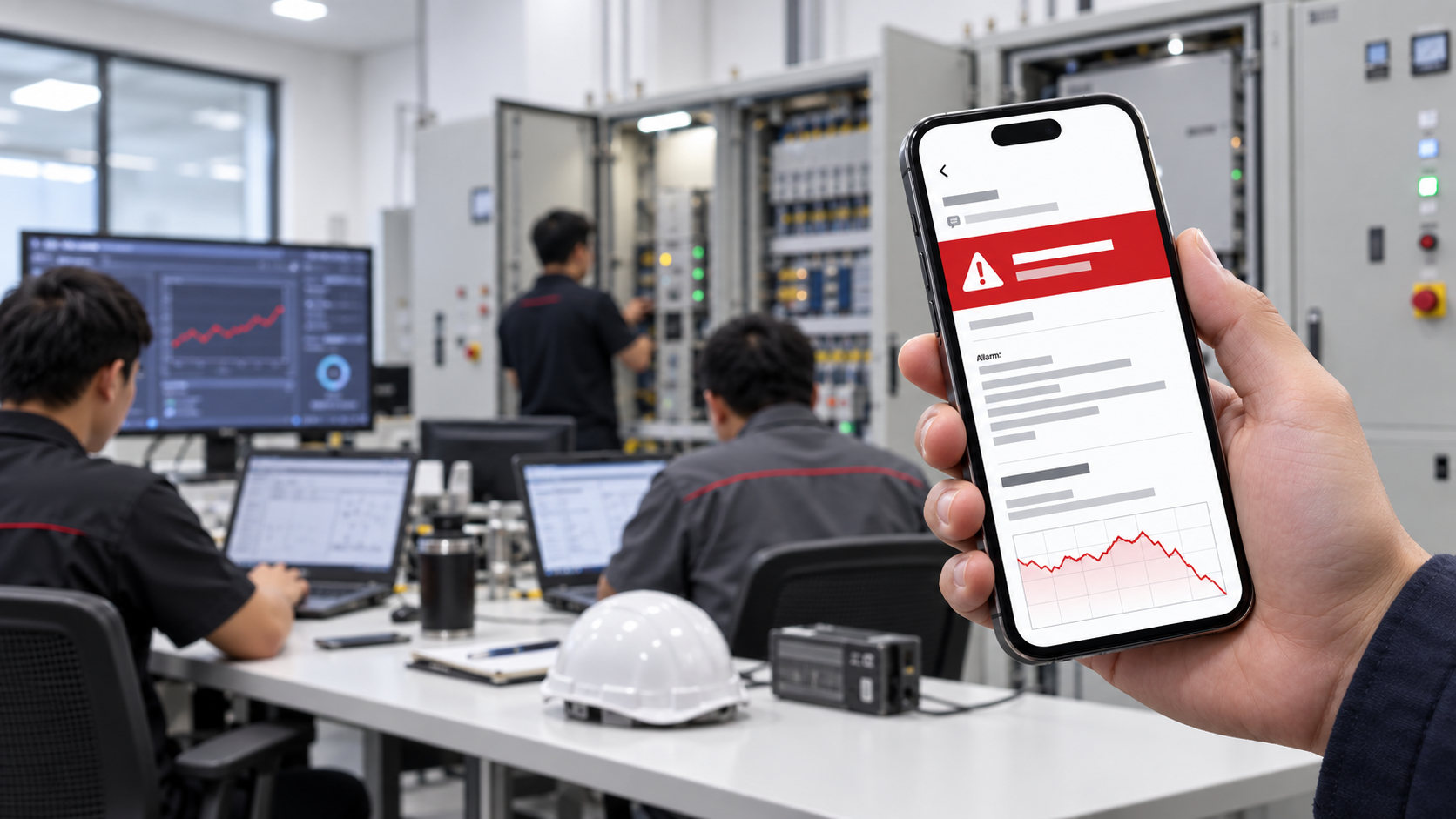
Why Industrial Sites Need an AlarmNX Alarm Management System
1. Critical alarms stay inside the control room
Many plants depend on an operator continuously watching an HMI or SCADA workstation. However, operators may need to inspect equipment, attend a breakdown or manage several areas at once. During nights, weekends or lean shifts, a critical alarm can remain visible on screen without reaching the technician who can act.
As a result, the plant may discover a trip, overflow, high temperature or utility failure only after production has already been affected.
2. Every alarm looks urgent
Poorly prioritised systems send too many notifications. When routine warnings and critical trips appear with the same urgency, people begin to treat every alarm as background noise. This alarm fatigue increases the risk that a genuinely important event will be overlooked.
Therefore, an effective system needs clear severity levels, sensible delays and routing rules that match the consequence of each condition.
3. Notifications stop with the first recipient
A basic SMS or email alert may reach one person, but the system often cannot tell whether that person saw it, understood it or took ownership. If the first contact is unavailable, the alarm may wait with no structured escalation.
Moreover, a personal message thread does not provide a reliable operational record. Supervisors may struggle to determine who received the alert, who acknowledged it and how long the response took.
4. Shift changes create communication gaps
Static recipient lists become outdated quickly. Day-shift staff may receive night alarms, while the actual on-call technician receives nothing. Cross-midnight shifts, public holidays and maintenance periods make the problem harder.
Consequently, the plant needs routing that follows the active shift instead of relying on a fixed list of phone numbers.
5. Alarm floods hide the root problem
One equipment failure can trigger many related alarms within seconds. Without prioritisation, suppression and context, the response team may spend valuable time sorting symptoms instead of addressing the initiating event.
In addition, expected alarms during planned maintenance can create unnecessary noise. The team needs a controlled way to suppress selected conditions without disabling protection or losing accountability.
6. Management cannot measure response performance
When alarm handling is scattered across screens, phone calls and messages, management has limited evidence for improvement. It becomes difficult to track recurring alarms, acknowledgment time, response time and problem areas.
Without a consistent incident history, the same nuisance alarms and operational delays can return month after month.
What Is the AlarmNX Alarm Management System?
AlarmNX is an on-premise industrial alarm management and notification platform. It connects to compatible PLC and SCADA environments through OPC UA, monitors selected variables and evaluates them against configured alarm rules. When a condition becomes active, AlarmNX routes the notification through the chosen channels and escalates it level by level until an authorised person acknowledges the incident.
The core alarm functions run on hardware controlled by the plant. Therefore, sites can keep alarm evaluation and escalation inside their operational network while enabling only the communication channels they need.
Key capabilities include:
- OPC UA connectivity for supported PLC and SCADA data sources.
- Rules based on thresholds, ranges, states or rates of change.
- Severity levels that separate routine warnings from critical events.
- Shift-aware routing to notify the team that is actually on duty.
- Escalation chains with defined recipients and response delays.
- Alarm acknowledgment from browser or mobile app.
- SMS, email, webhook and mobile push notification options.
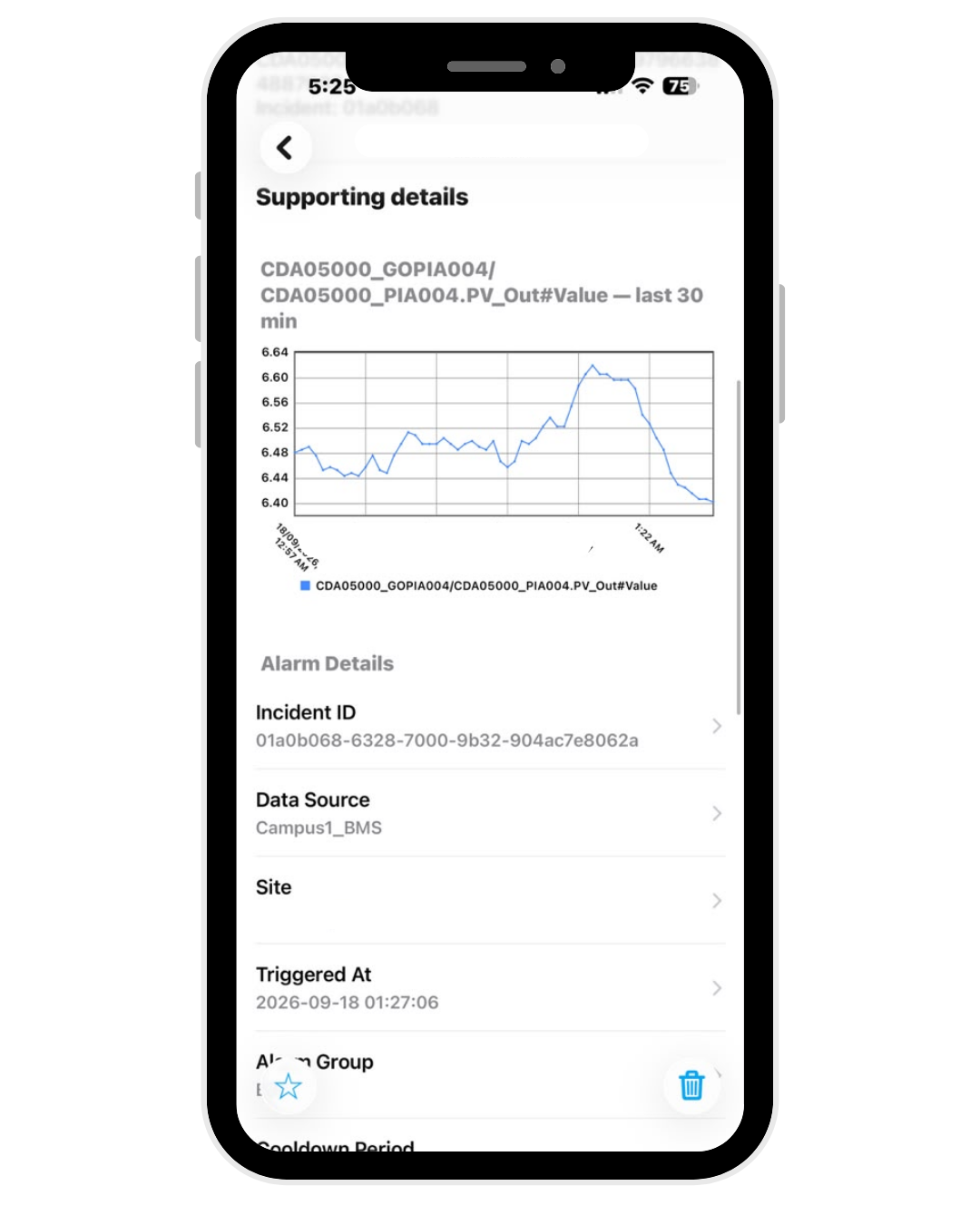
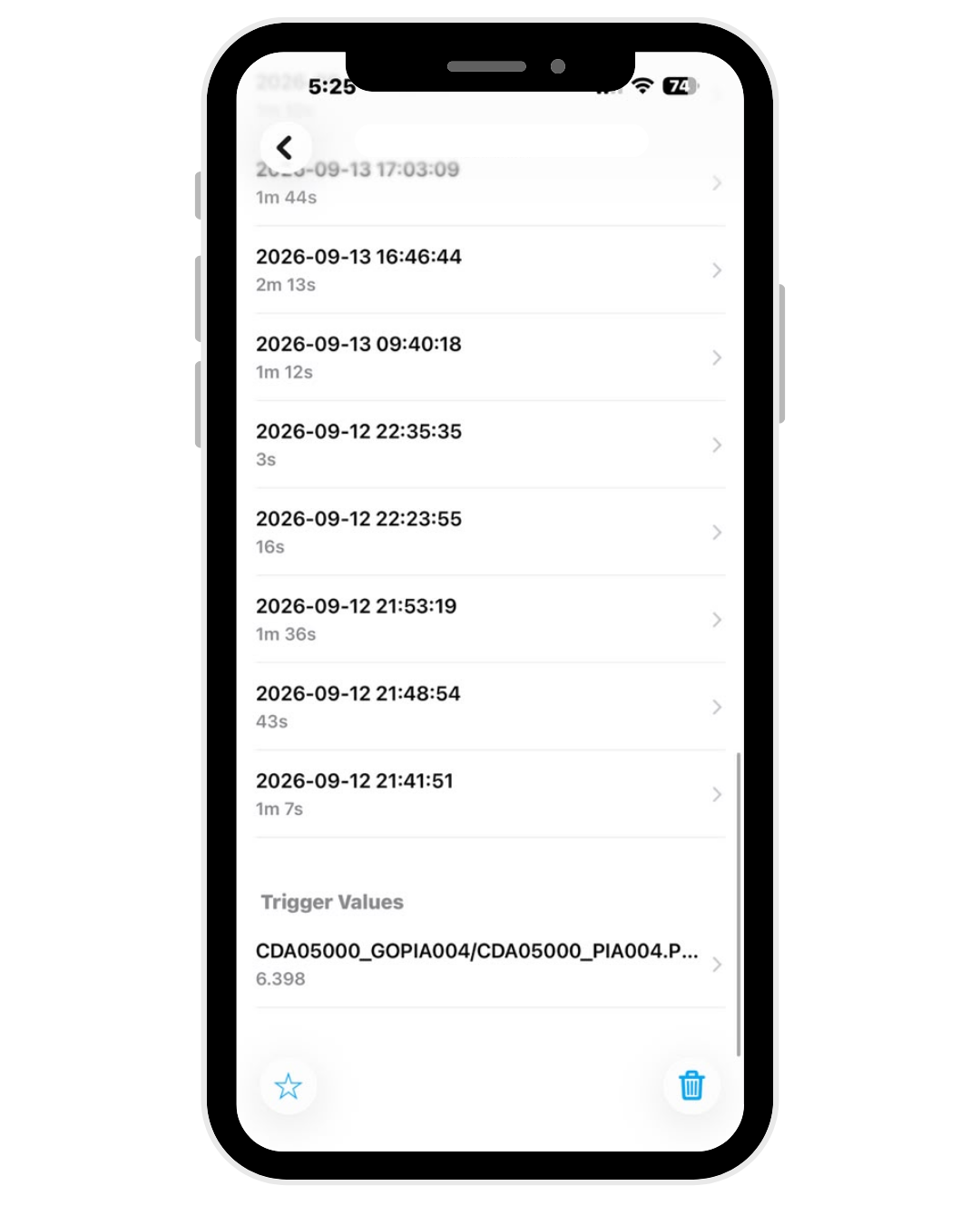
- Incident timelines, delivery records and audit history.
- Dashboards, analytics and scheduled reports.
- Suppression windows for planned maintenance activities.
For detailed product capabilities, review the official AlarmNX product overview.
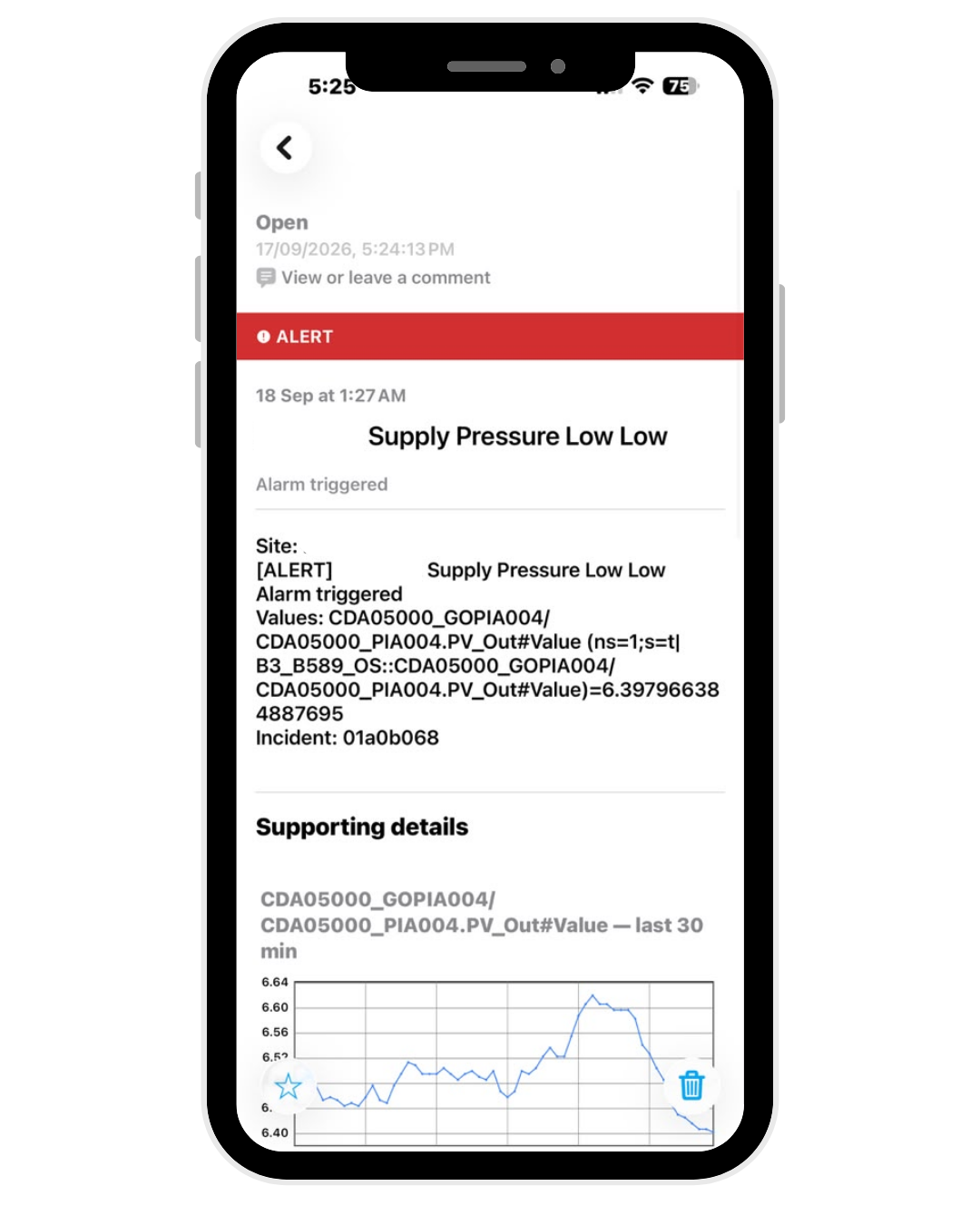
Free Mobile Push Notifications for the AlarmNX Alarm Management System
Notification costs should not become another task for the maintenance team. Ener Tech also offers a free, non-subscription Mobile Push App for alarm notification with an AlarmNX deployment. Unlike a message-count subscription channel, this option does not require users to track how many alarm notifications they receive.
Many clients prefer this approach because the mobile push app is free and they do not need to monitor message usage. Teams can focus on reviewing alarms and responding to incidents instead of keeping track of a notification allowance.
What can the free Mobile Push App show?
- Active alarms: Review alarm severity, open status and unacknowledged events, with an Acknowledge action available to responders.
- Incident records: Review open, acknowledged and closed incidents, and filter the list by criteria such as priority or unread status.
- Analytics: Review incident frequency and available acknowledgment and resolution metrics to support response reviews.
- Monitored tags: View selected process values and their update status. The number of monitored tags depends on the applicable AlarmNX licence tier.
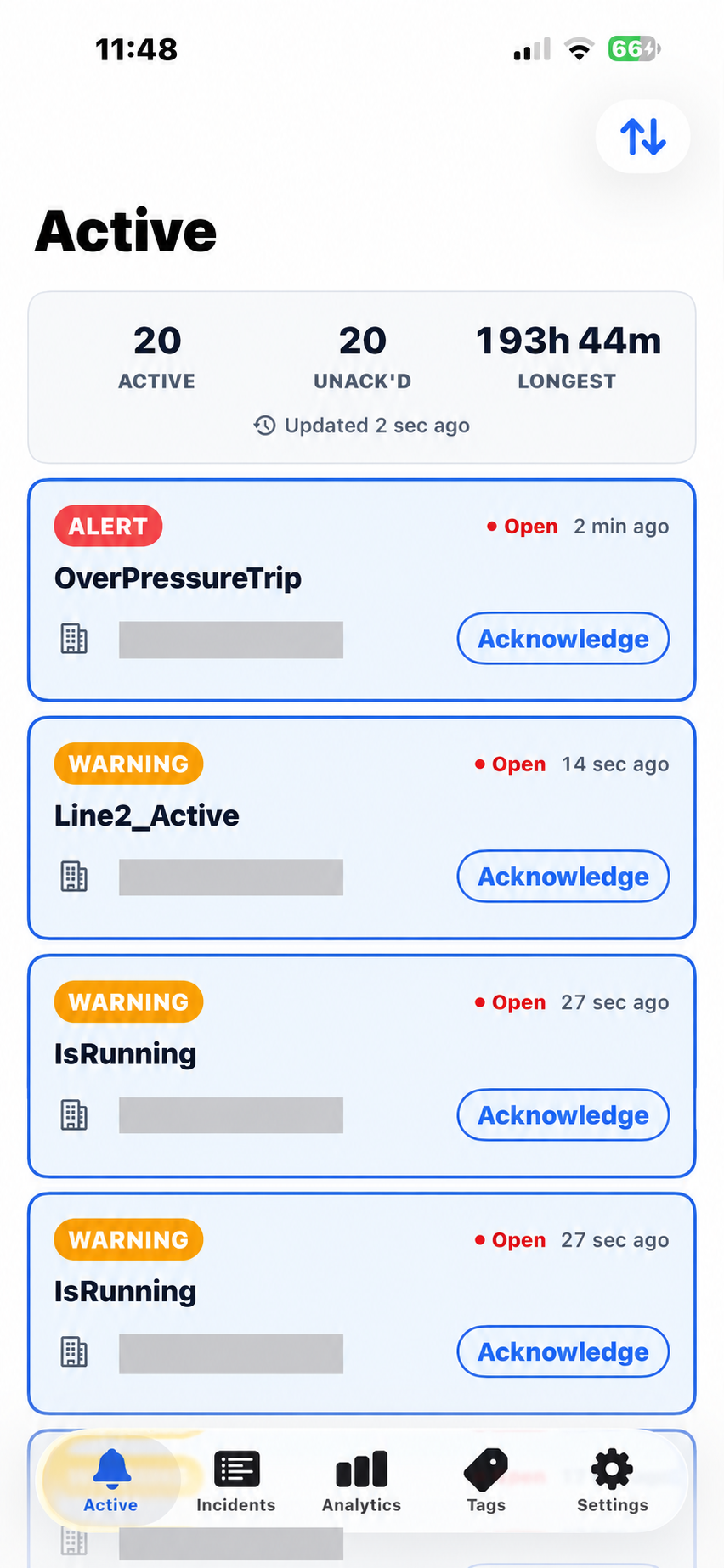
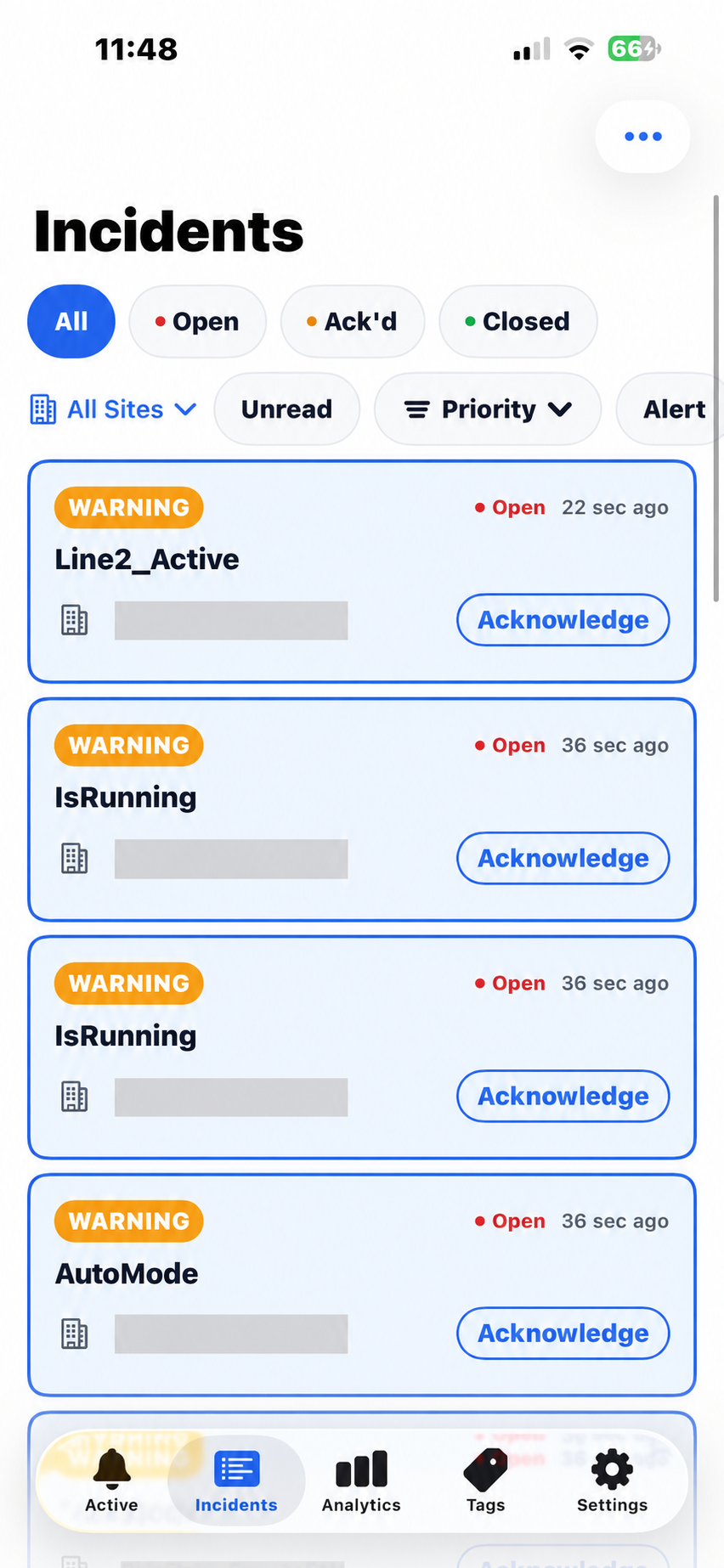
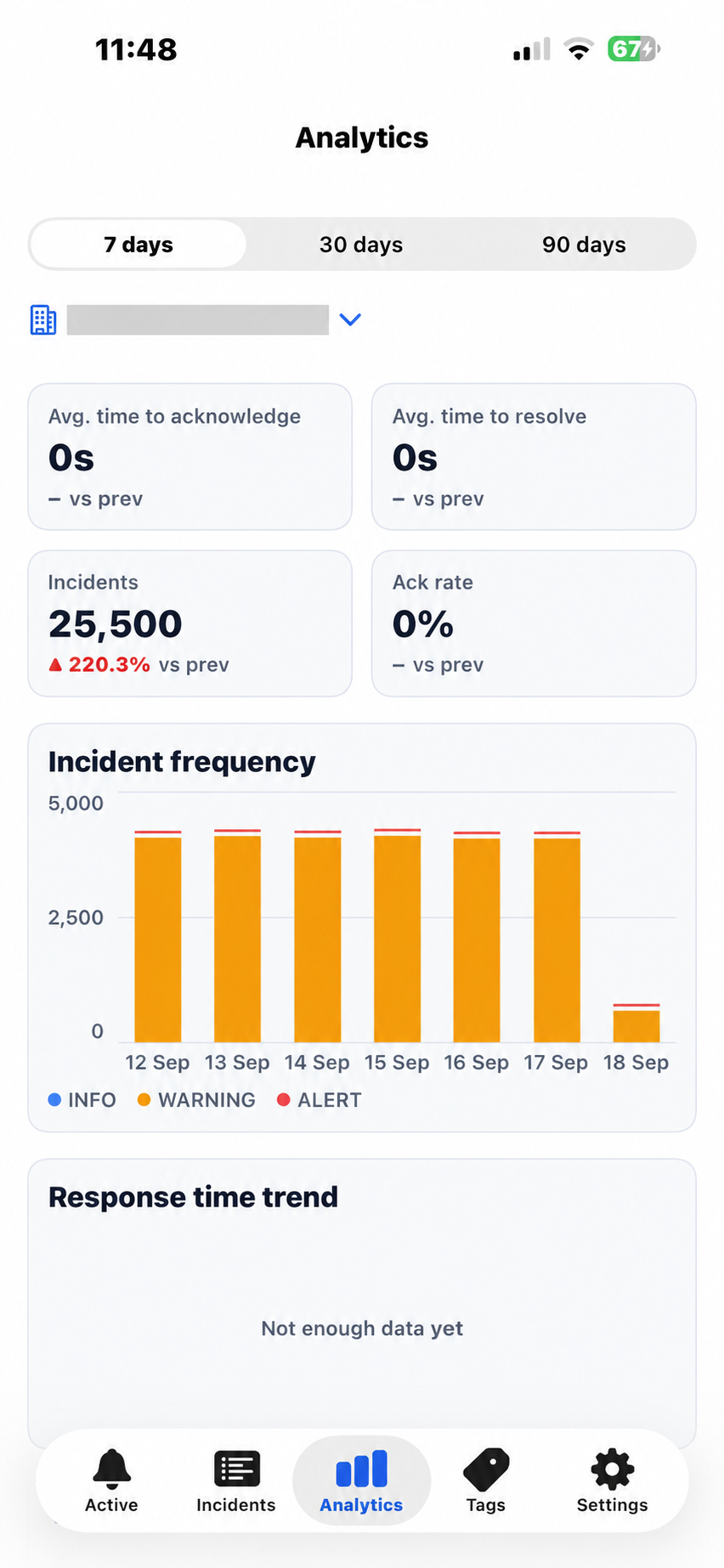
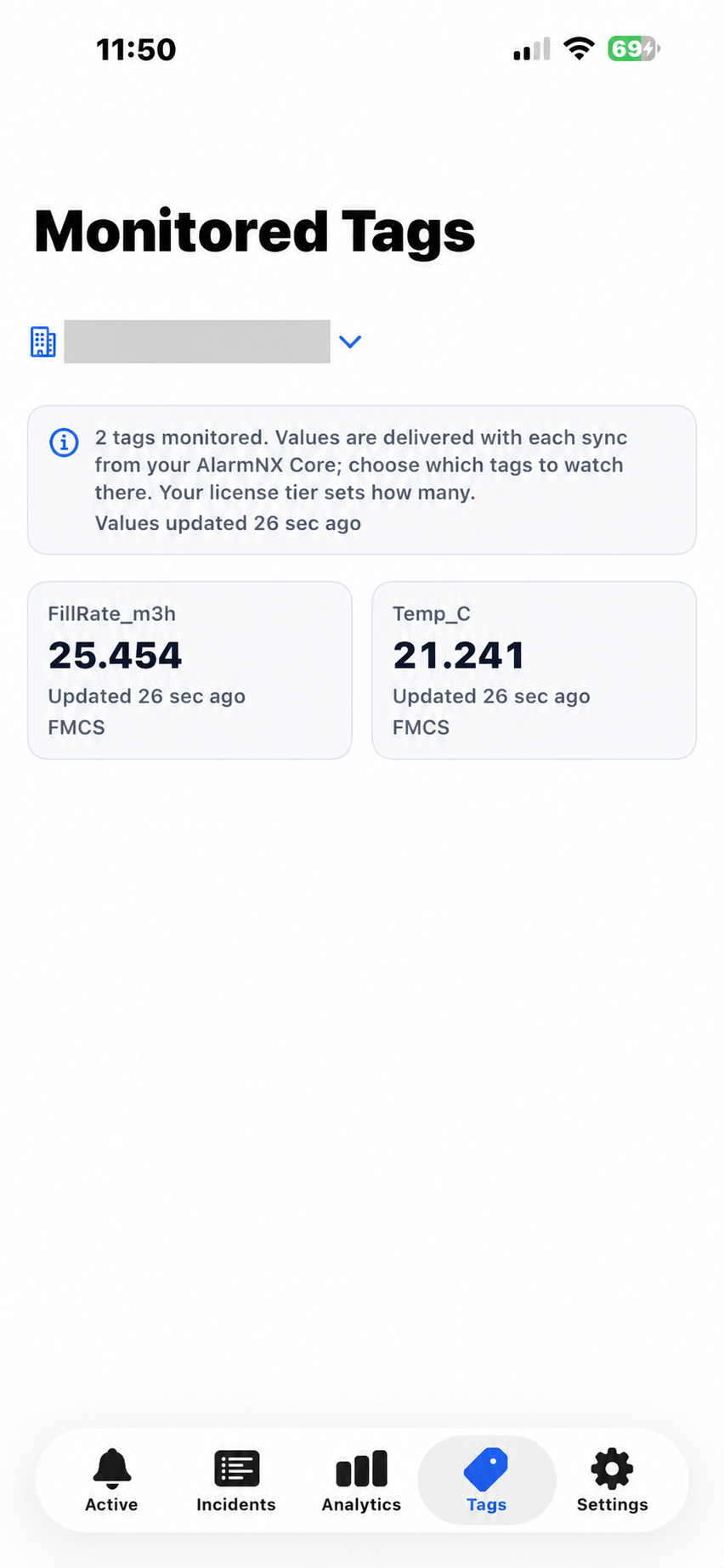
App screenshots are for illustration only.
Free Mobile Push App or dotdoplus: which option fits your site?
The dotdoplus mobile screenshots elsewhere in this article show a separate notification option with a subscription based on message count. The free Mobile Push App does not require a notification-message subscription or received-message usage tracking. Ener Tech helps each plant choose the delivery method that fits its response workflow and cost preferences.
Free refers to the mobile push app and its notification subscription model, not to the entire AlarmNX system or engineering project. System licensing, integration, commissioning, connectivity and any separately selected communication services are assessed as part of the project scope. Mobile push also requires a working internet connection and the appropriate phone notification permissions.
How Ener Tech makes mobile notifications practical
Ener Tech reviews the alarm sources, on-duty recipients and escalation needs before configuring the selected mobile delivery option. We then test notification delivery, acknowledgment and escalation with the plant team, including phone notification settings and the agreed fallback channels. As a result, the mobile app becomes part of a defined response process rather than just another source of alerts.
How the AlarmNX Alarm Management System Addresses These Pain Points
Escalation continues until someone takes ownership
AlarmNX can send an alarm to the first response level and wait for acknowledgment. If nobody responds within the configured delay, the system moves to the next level. Once a responder acknowledges the incident, the escalation stops and the action is recorded.
This approach replaces uncertainty with a defined ownership process. The plant can see when the alarm started, which channel delivered it and who accepted responsibility.
The right alarm reaches the right shift
Shift-aware routing matches recipients to the active schedule. For example, a production alarm can first notify the on-duty operator, then escalate to the shift supervisor and finally reach the on-call engineer if required.
Because routing follows a defined roster, the plant does not need to depend on informal forwarding during every shift change.
Multiple channels improve delivery resilience
Different sites have different communication constraints. AlarmNX supports several delivery methods, including local modem SMS, hosted SMS, email, webhook and native mobile push. The design can use the channels that fit the site’s network, operating model and availability requirements.
For sites that must continue notifying during an internet interruption, local modem SMS can provide an independent path. In addition, redundant SMS routes can help reduce dependence on a single modem or carrier.
Incident history supports continuous improvement
AlarmNX records the incident timeline from trigger through acknowledgment and clearance. Consequently, teams can review recurring alarms, notification attempts and response behaviour instead of relying on memory.
Analytics such as Mean Time to Acknowledge and Mean Time to Respond can help management identify delays and measure whether corrective actions are working. These records also provide a stronger basis for maintenance reviews and alarm rationalisation.
How Ener Tech Implements AlarmNX for Industrial Sites
Ener Tech Solutions is listed as an AlarmNX partner in Malaysia. Our role is not limited to installing software. We help connect the platform to the plant’s actual control system, operating structure and response procedures.
1. Assess the existing alarm workflow
First, Ener Tech reviews how alarms currently move from the process to the people responsible for action. The assessment may cover PLC and SCADA architecture, OPC UA availability, existing alarm lists, shift patterns, communication channels and current response procedures.
We also identify practical pain points. These may include missed night-shift alarms, alarm floods, outdated contact lists, repeated nuisance alarms or a lack of acknowledgment records.
2. Define priorities and escalation logic
Next, Ener Tech works with the plant team to classify alarms by consequence and urgency. A production warning should not necessarily follow the same path as a safety-related trip or critical utility failure.
For each selected alarm, we define recipients, escalation levels, delay times and acknowledgment requirements. This step keeps the design aligned with the site’s real organisation instead of applying a generic contact list.
3. Design the OPC UA integration
Ener Tech then maps the required PLC or SCADA variables into the AlarmNX architecture. Our engineers verify tag availability, data quality, update behaviour and communication requirements before configuring the alarm rules.
Where necessary, we also review server placement, network access, operating system, database sizing and available notification paths. The objective is a maintainable on-premise design that fits both OT and IT requirements.
4. Configure notifications and resilience
After the core alarm logic is ready, Ener Tech configures the agreed delivery channels. The final arrangement may combine SMS, email, webhook or app push according to site needs.
We also consider delivery failure scenarios. For example, a plant may require a backup SMS route, a secondary data source or health-check messages that confirm the alarm system is still operating.
5. Test the complete response chain
Testing must prove more than a message appearing on a phone. Ener Tech verifies the complete sequence from the source tag to alarm activation, notification, escalation, acknowledgment and event clearance.
Typical checks may include simulated process conditions, priority handling, recipient routing, escalation delay, communication failure, acknowledgment behaviour, suppression windows and incident history. In addition, we document the agreed results through the applicable FAT or SAT process.
6. Train users and support the handover
Finally, Ener Tech helps operators, maintenance personnel, engineers and administrators understand their roles. Training can cover alarm acknowledgment, incident review, shift updates, report use and basic administration.
The handover also includes the relevant configuration records, test evidence and operating guidance. After commissioning, Ener Tech can support optimisation, maintenance and future expansion as the plant’s alarm strategy develops.
AlarmNX Alarm Management System Benefits for Plant Owners
A properly engineered AlarmNX deployment can support several operational improvements:
- Fewer missed critical alarms: Escalation continues when the first recipient does not respond.
- Faster response: The right on-duty personnel receive clear notifications without staying beside an HMI.
- Clear accountability: Acknowledgment and incident records show who acted and when.
- Lower alarm fatigue: Priority, routing and suppression rules reduce avoidable notification noise.
- Better resilience: Multiple delivery options and health monitoring reduce dependence on one communication path.
- Improved analysis: Incident history and performance metrics reveal recurring alarms and response bottlenecks.
- Stronger maintainability: A documented system is easier to test, support and expand.
- Controlled OT deployment: Core alarm processing remains on premises and can operate without a mandatory cloud dependency.
These benefits depend on correct engineering and configuration. AlarmNX provides the tools, while Ener Tech helps the plant apply them to its people, processes and control systems.
Common AlarmNX Implementation Mistakes to Avoid
Even a capable platform can underperform when the surrounding workflow is weak. Common mistakes include:
- Sending every alarm to every person.
- Treating all alarms as the same priority.
- Using a static contact list that does not follow shifts.
- Copying existing alarms without reviewing nuisance or duplicate conditions.
- Testing message delivery without testing escalation and acknowledgment.
- Ignoring modem, network or data-source failure scenarios.
- Launching the system without operator and administrator training.
- Failing to review alarm performance after commissioning.
Therefore, the implementation should start with the operational problem, not the software screen.
Frequently Asked Questions
Can AlarmNX connect to an existing PLC or SCADA system?
AlarmNX connects to compatible PLC and SCADA data sources through OPC UA. Ener Tech can review the existing architecture and confirm the integration approach for the selected tags and alarm conditions.
Does AlarmNX require the cloud for core alarm processing?
No. AlarmNX runs on premises, and its core alarm evaluation and escalation operate on the site’s own hardware. However, optional services such as mobile push or hosted communication channels may use an external connection when enabled.
Can an alarm escalate if the first person does not respond?
Yes. The system can move through configured escalation levels after defined delays. Acknowledgment stops the escalation and records the responder.
Can AlarmNX follow different shifts?
Yes. Shift-aware routing can send alarms to the team that is active when the event occurs. Ener Tech helps configure the schedule and recipient logic around the site’s operating structure.
Can the plant use SMS when the internet is unavailable?
AlarmNX can send SMS through a local cellular modem. The final availability still depends on the selected hardware, mobile network coverage and the engineered redundancy arrangement.
Is there a free, non-subscription mobile alarm notification option?
Yes. Ener Tech offers a free Mobile Push App for AlarmNX alarm notification, without a notification-message subscription or received-message usage tracking. This is separate from the dotdoplus message-count subscription option. AlarmNX system licensing and implementation services remain part of the agreed project scope.
How does Ener Tech start an AlarmNX project?
We begin with an assessment of the current alarm sources, communication methods, response team and operational pain points. From there, we define the architecture, scope, testing plan and implementation steps.
Move from Alarm Visibility to Accountable Action
An alarm only creates value when it reaches someone who can act. The AlarmNX alarm management system provides escalation, shift-aware routing, multi-channel delivery and incident records that help industrial teams respond with greater clarity.
Ener Tech brings the engineering work around the platform: assessment, integration, configuration, testing, commissioning, training and support. The result is not simply another notification tool. It is a structured response process connected to the plant’s existing automation environment.
Learn more about our industrial automation services or contact Ener Tech to discuss an AlarmNX assessment or guided demonstration.